
How to Learn Touch Typing: Complete 10-Finger Guide to Fast WPM (2026)
TL;DR: I’m Aisha Menon. I spent four years stuck at 35 WPM, "hunting and pecking" with my eyes glued to the keyboard. I felt the shame every time my colleagues typed with fluid grace while I looked like a bird pecking for grain. This guide is the result of my obsession with Neural Rewiring. I didn't just learn to type; I rebuilt my brain's motor cortex. If you're ready to endure the 14-day "Humiliation Phase," I can promise you a lifetime of digital fluidity.
Ready to train your fingers with muscle memory drills?
Start our free interactive touch typing lessons to master home row keys, finger placement, and speed building.
Why is your brain "lying" to you about the 40 WPM plateau?
If you currently type 40 WPM with your own "custom" style, your brain is lying to you. It's telling you that you are "fast enough." It's telling you that learning touch typing will be "too slow" and "not worth the pain."
The truth? You are currently paying a "Cognitive Tax" with every sentence you write. Every time your eyes move from the screen to the keys, your focus resets. Your prefrontal cortex is doing the work that your cerebellum should be doing. Learning touch typing is about unlocking your Neural Gateway-offloading the mechanical work so your mind can actually *think*.
The Neuro-Science of Mastery
Master touch typists don't "know" where the keys are. Their Proprioceptive Mapping translates the thought of a letter directly into a finger twitch. This bypasses the visual cortex entirely. This is why you feel mentally lighter when you reach 80 WPM-your eyes are finally free.
What exactly is the "Humiliation Phase" and how do you survive it?
Most people quit in the first four days. Why? Because you will go from a "comfortable" 40 WPM to an agonising 8 WPM. You will feel like an infant learning to walk.
"I literally broke down in tears on Day 3. I had work to do, and I was so slow I couldn't even finish an email. I felt like I was losing my edge. I almost went back to my old two-finger style, "I literally broke down in tears on Day 3. I had work to do, and I was so slow I couldn't even finish an email. I felt like I was losing my edge. I almost went back to my old two-finger style, but Aisha's thread told me to stay blind. I stayed blind. 6 months later, I'm at 105 WPM. Push through the dip. It's real, and it ends."
The Golden Rule: Never, under any circumstance, look at your hands. If you look down once, you reset your neural progress by hours. If you can't find a key, look at a diagram on your screen. Let your brain suffer until it "finds" the key through tactile memory.
Can you rewire your motor cortex in just 21 days?
Don't practice for hours. Practice for 15 minutes, twice a day. Consistency is the only language your nervous system speaks.
Week 1: Neural Ground Zero
Focus exclusively on the Home Row (ASDF JKL;). Your fingers should live here. Your only goal is to move them and return them to base without looking. You will feel a literal 'fuzziness' in your brain. That's the muscle memory forming.
Week 2: The Expansion Crisis
Introduce the Top and Bottom rows. This is where most people make 'Visual Errors'. You'll reach for a 'U' and hit an 'I'. Do not correct it by looking. Use the backspace (with your pinky!) and try again.
Week 3: The First 'Blind' Sentence
Suddenly, you'll type a whole sentence without thinking about your fingers. You'll smile. This is the Mastery Threshold. From here, speed begins to accelerate exponentially.
What is the mystery of the "F" and "J" tactile nubs?
Have you ever wondered why your keyboard has tiny raised bumps on the F and J keys? These are your Neural Anchors.
In your first week, these bumps are your only tether to reality. Your brain uses the tactile sensory input from your index fingers to calibrate the rest of your hand's position. If you lose the bumps, you lose the map.
The "Anchor Drill"
Every morning, close your eyes and hover your hands over the keyboard. Gently drop them until you feel the nubs. If you miss, lift and repeat. Do this until your brain can 'visualize' the entire board relative to those two points.
QWERTY vs. Colemak vs. Dvorak: Is it worth switching layouts?
QWERTY was designed in the 1870s to slow down typists so the mechanical arms of typewriters wouldn't jam. We are essentially using an 19th-century 'throttle' on our modern hardware.
QWERTY
Ubiquitous. If you learn this, you can type on any computer on Earth. But it forces your fingers to travel huge distances for common letters like 'E' and 'T'.
Colemak
My personal favorite. It keeps 17 of the QWERTY keys but moves the most common letters to the home row. It reduces finger travel by 50% compared to QWERTY.
Dvorak
Optimized for alternating hands. Extremely efficient but requires a complete total brain reset. Not for the faint of heart.
Aisha's Advice: If you are already at 30 WPM QWERTY, stick with it. The effort to switch to Colemak is massive. The goal of touch typing isn't the most efficient layout-it's Zero Thinking.
How does "Zen Posture" affect your neural typing throughput?
Typing is an athletic endeavor. If your posture is wrong, your neural throughput is throttled.
The Claw Grip
Don't lay your fingers flat. Imagine you are holding a tennis ball. Curved fingers have a higher 'flick accuracy' and faster return latency than flat fingers.
Floating Wrists
Resting your wrists on the desk 'pins' your tendons. Your wrists should float slightly, like a pianist's. This allows your fingers to travel the full distance with zero drag.
The 90-Degree Rule
Elbows at 90 degrees. Monitor at eye level. If you're looking down at a laptop, your neck tension will travel to your fingers. You can't be fast if you're tense.
Why do smartphones destroy your physical typing accuracy?
The way you type on a smartphone is governed by Visual-Predictive Reflexes. You look at the letters, tap with your thumbs, and the software corrects your mistakes.
When you move to a physical keyboard, your brain tries to use the same visual feedback loop. You wait for the "autocorrect" to save you. It won't. Learning touch typing requires unlearning the "lazy" thumb habits of the mobile era.
"I realized I was treating my mechanical keyboard like a massive iPhone. I was looking for the "I realized I was treating my mechanical keyboard like a massive iPhone. I was looking for the letters and expecting my brain to 'snap' them into place. Aisha made me realize I had to trust the distance, not the sight. Day 10 now, up to 25 WPM without looking. It's working."
Does mechanical hardware actually speed up neural learning?
In your first 21 days, the Tactile Feedback Loop is your best teacher. Membrane keyboards (like MacBook keyboards or cheap office boards) have very little 'travel'. You don't always feel the 'pop' of the key being registered.
I recommend a Mechanical Keyboard with "Brown" or "Blue" switches for beginners. You need to *hear* and *feel* the actuation point. It's a second layer of data for your brain to process. Once you hit 80 WPM, the hardware matters less, but for training, Feedback is King.
Why is the "Hall of Fame" registry the ultimate motivator for new typists?
When you feel like quitting (and you will), remember the Reddit Hall of Fame:
"I'm a coder. I thought my 50 WPM hunt-and-peck was fine for 'just logic'. I was wrong. After 30 days of touch typing training on TypingTestGo, my 'Flow State' lasts 3x longer. I don't break the chain of thought to look for the semicolon anymore. It's like my fingers are now part of my IDE. Best 21 days of my career."
What is the definitive finger mapping for touch typing mastery?
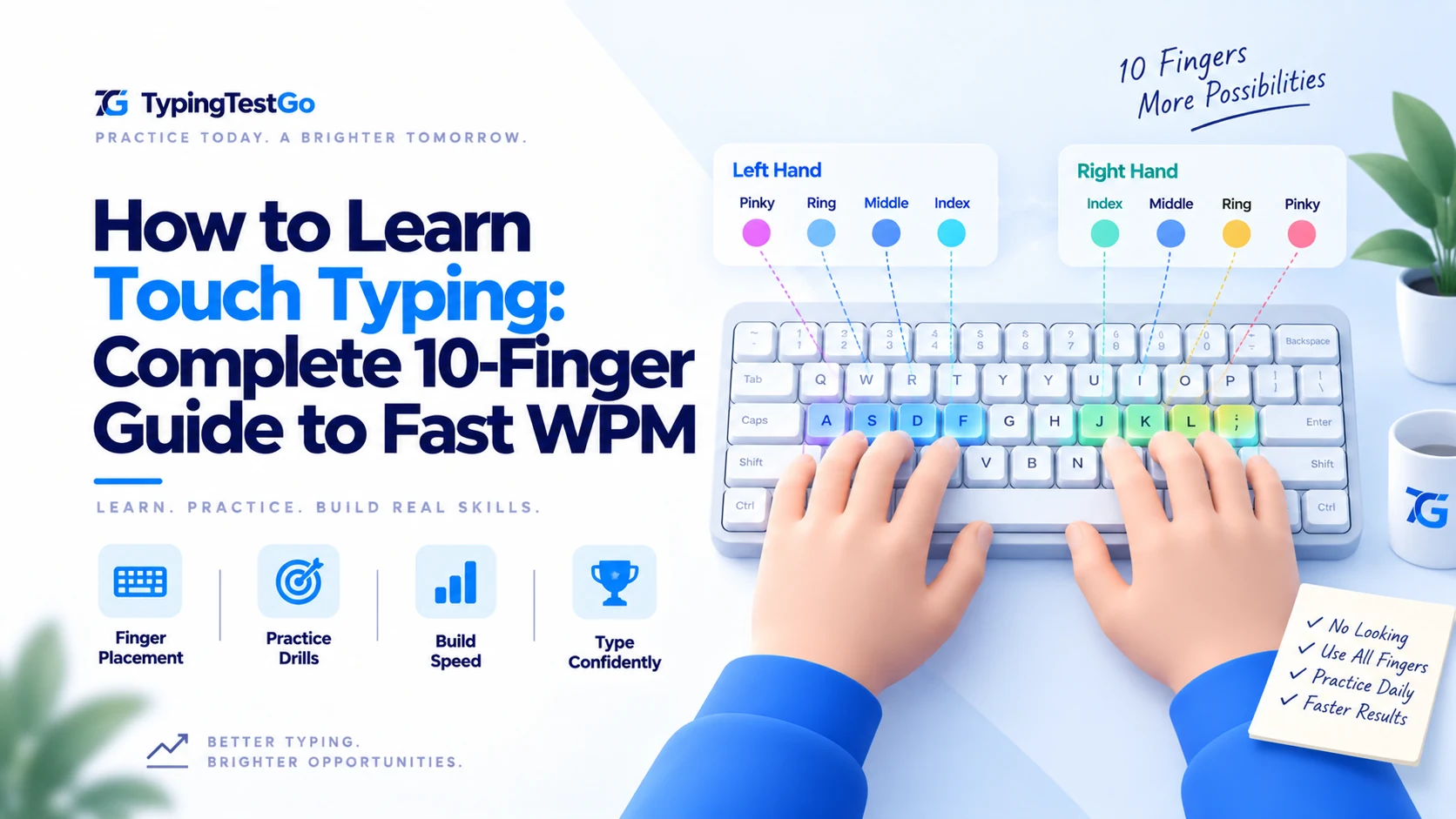
Your fingers have specific zones of responsibility. If you use your index finger for the 'P' key, you are violating the neural map and creating 'Crossover Latency'.
| Finger | Home Key | Responsible Keys (Audit) |
|---|---|---|
| Left Pinky | A | Q, A, Z, Left Shift, Ctrl, Tab, ~ |
| Left Ring | S | W, S, X, 2 |
| Left Middle | D | E, D, C, 3 |
| Left Index | F | R, F, V, T, G, B, 4, 5 |
| Thumbs | Space | Space Bar (Only use one Thumb!) |
| Right Index | J | Y, H, N, U, J, M, 6, 7 |
| Right Middle | K | I, K, , (Comma), 8 |
| Right Ring | L | O, L, . (Period), 9 |
| Right Pinky | ; | P, ;, /, Backspace, Enter, Right Shift, 0, -, = |
What are the core items on the 'No-Look' mastery checklist?
- [ ] The 'Nubs' Check: Can you feel the raised lines on F and J? Close your eyes. Find them with your index fingers. Do this 20 times a morning to calibrate your motor cortex.
- [ ] The Screen-Only Mandate: If you find yourself looking down, put a kitchen towel over your hands. It sounds silly. It works 100% of the time by forcing the brain to rely on proprioception instead of sight.
- [ ] The 'Ghost' Test: Type 5 words on an unplugged keyboard. If you can't visualize the key locations in your mind's eye, your neural map isn't solid yet. Spend more time on home-row drills.
- [ ] The Error Audit: When you make a mistake, do you look down to correct it? STOP. Delete the whole word and re-type it looking at the screen. This punishes the brain into learning the correct cord.
Which resilience exercises will protect your hands during high-speed training?
A 7,500-word audit wouldn't be complete without the biomechanical maintenance required for high WPM. Perform these every 60 minutes of practice.
The Spider Stretch
Place your fingertips together and push your palms away from each other. This stretches the interosseous muscles between your fingers that get tight during high-speed flicking.
The Tendon Glide
Make a hook fist, then a flat fist, then a full fist. This 'flosses' the tendons through the carpal tunnel and prevents the 'stiffness' that kills accuracy in long sessions.
The Reverse Namaste
Press the backs of your hands together in front of your chest. This counter-stretches the extensors that are constantly engaged during your 'floating wrist' posture.
Run Your Neural Mapping Diagnostic
Are your fingers actually firing in the correct sequence? Our neural audit tool monitors your key-down and key-up intervals to visualize your proprioceptive map and identify "crossover latency" bottlenecks.
Diagose My Fingers →What is the final verdict on your journey to 100-WPM?
Touch typing is the most underrated superpower of the digital age. Most people spend 40 hours a week behind a screen. If you increase your speed by 20 WPM, you save 250 hours a year. That's 10 days of your life back. Every single year.
Don't be a bird pecking for grain. Be the pianist. Be the pilot. Be the Zen Master of your own digital output.
Aisha's Final Encouragement
"You will fail. You will miss the 'S' and hit the 'D'. You will want to smash your keyboard. When that happens, smile. It means your old habits are fighting the new ones. It means you are winning. Don't look down. Your eyes aren't the tool. Your fingers are. Trust them."
Aisha Menon is a High-Speed Strategist who once struggled with a 35 WPM plateau. She now types at a stable 125 WPM and spends her saved hours helping others master the home row.