
How Old Phone Texting Worked: The Lost Science of T9 Keypads
Picture this: It is 2004. A high school student sits in the back row of a history lecture with their hands buried deep inside a winter jacket pocket. Their thumb is furiously tapping away at a plastic Nokia 3310 keypad. They aren't looking at the screen. They aren't looking at their fingers. Yet, in under twenty seconds, they send a perfectly punctuated, 140-character SMS without a single typo.
Fast forward to 2026. We carry handheld supercomputers with vibrant OLED displays, capacitive glass, tactile linear haptics, and generative AI autocorrect engines. Yet, almost every smartphone user struggles to type a three-sentence reply without an embarrassing typo, an awkward autocorrect replacement, or having their eyes completely glued to the glass.
How did a primitive, 12-button numeric keypad allow an entire generation to text faster, more accurately, and completely blind? The answer is not just nostalgia—it is a masterclass in linguistic data compression, tactile proprioception, and an algorithm known as T9 (Text on 9 Keys).
Think you can still text on a classic 3310 keypad?
Try our interactive retro T9 keypad typing test to experience multi-tap texting directly in your browser.
The 3×4 Keypad Puzzle: Why Did Old Phones Have Letters on Numbers?
To understand how texting on old phones worked, you first have to understand the physical constraint engineers faced in the late 1990s. Telephones were never designed for literature; they were designed for dialing telephone numbers.
Under the international telecommunications standard (ITU-T E.161), the 12-button telephone keypad was mapped with letters to assist with alphanumeric dialing (such as 1-800-FLOWERS):
- Key 1: Punctuation and symbols (.,?!')
- Key 2: A, B, C
- Key 3: D, E, F
- Key 4: G, H, I
- Key 5: J, K, L (featuring a raised physical homing pip)
- Key 6: M, N, O
- Key 7: P, Q, R, S (4 letters)
- Key 8: T, U, V
- Key 9: W, X, Y, Z (4 letters)
- Key 0: Space character and word confirmation
- Key *: Case shift (Caps Lock) and symbol picker
- Key #: Word cycle / Next candidate selector
This presented a classic computer science challenge known as the pigeonhole problem: how do you fit 26 English letters onto just 8 numeric keys without forcing users to spend three minutes typing a single sentence?
The Agony of Multi-Tap: When Typing "S" Took Four Clicks
Before T9 arrived, the default way to send an SMS was a brute-force method called Multi-Tap (or explicit disambiguation).
In Multi-Tap, every letter required multiple rapid presses of the corresponding number key:
- To type A, you pressed
2once. - To type B, you pressed
2twice. - To type C, you pressed
2three times. - To type S, you had to hammer
7four times in rapid succession.
The Dreaded "Character Timeout"
The biggest flaw of Multi-Tap occurred when two consecutive letters lived on the exact same key. Consider typing the word "NO". Both 'N' and 'O' reside on Key 6. To type 'N', you pressed 6-6. But if you immediately pressed 6-6-6 for 'O', the phone thought you were trying to select a different letter on that same key!
Users had to wait for an agonizing 1.5-second pause for the cursor to underline and advance, or manually hit the Right navigation rocker before typing the next letter. The average typing speed on Multi-Tap was a sluggish 8 to 14 WPM.
The Accidental Breakthrough: How T9 Was Born
In 1987, researchers Cliff Kushler, Dale Grover, and Martin King were not trying to build a mobile phone gadget. They were working on an assistive communication system for people with severe physical disabilities using an early eye-tracking headset.
The eye tracker could only reliably detect eight distinct gaze fixation zones on a monitor. Because 26 letters could not fit into eight separate gaze zones, Kushler and King grouped the alphabet into clusters of three to four letters. To make typing feasible, they wrote an algorithmic dictionary that calculated which word the user was spelling based on the sequence of gaze points.
In 1995, Kushler realized that mobile phones had the exact same geometry: 8 numeric buttons representing 26 letters. They founded Tegic Communications, trademarked the name T9 (short for "Text on 9 keys", representing keys 1 through 9), and licensed the software to telecommunications giants.
In 1999, T9 debuted on the Benefon iO in Europe and the Samsung Anycall in Asia, followed by iconic handsets like the Nokia 3210 and Nokia 3310. Within three years, T9 was installed on hundreds of millions of pocket devices worldwide.
Under the Hood: How the T9 Predictive Algorithm Actually Worked
Instead of forcing you to tell the phone which letter you wanted on every key, T9 introduced implicit disambiguation: one keypress per letter.
To write the word "BALL", you didn't press 2-2, wait, 2, 5-5-5, wait, 5-5-5 (11 total presses). You simply pressed:
2 - 2 - 5 - 5 (4 presses total)
As your thumb tapped those numbers, the screen would briefly flash nonsensical intermediate combinations like "aaj", then "bak", before resolving cleanly into "ball" upon the final keystroke. Here is the engineering that made that instant conversion possible on phones with less than 2MB of memory:
1. Compressed Trie Trees (Prefix Trees)
In 1999, mobile phones had microcontrollers clocked at 13 MHz with minute amounts of RAM. Tegic compressed a 25,000-word English dictionary into a compact tree data structure where each node represented a number from 2 to 9. Navigating a branch required virtually zero CPU overhead—each keypress simply traversed one node deeper down the tree branch.
2. The Textonym Dilemma (Word Collisions)
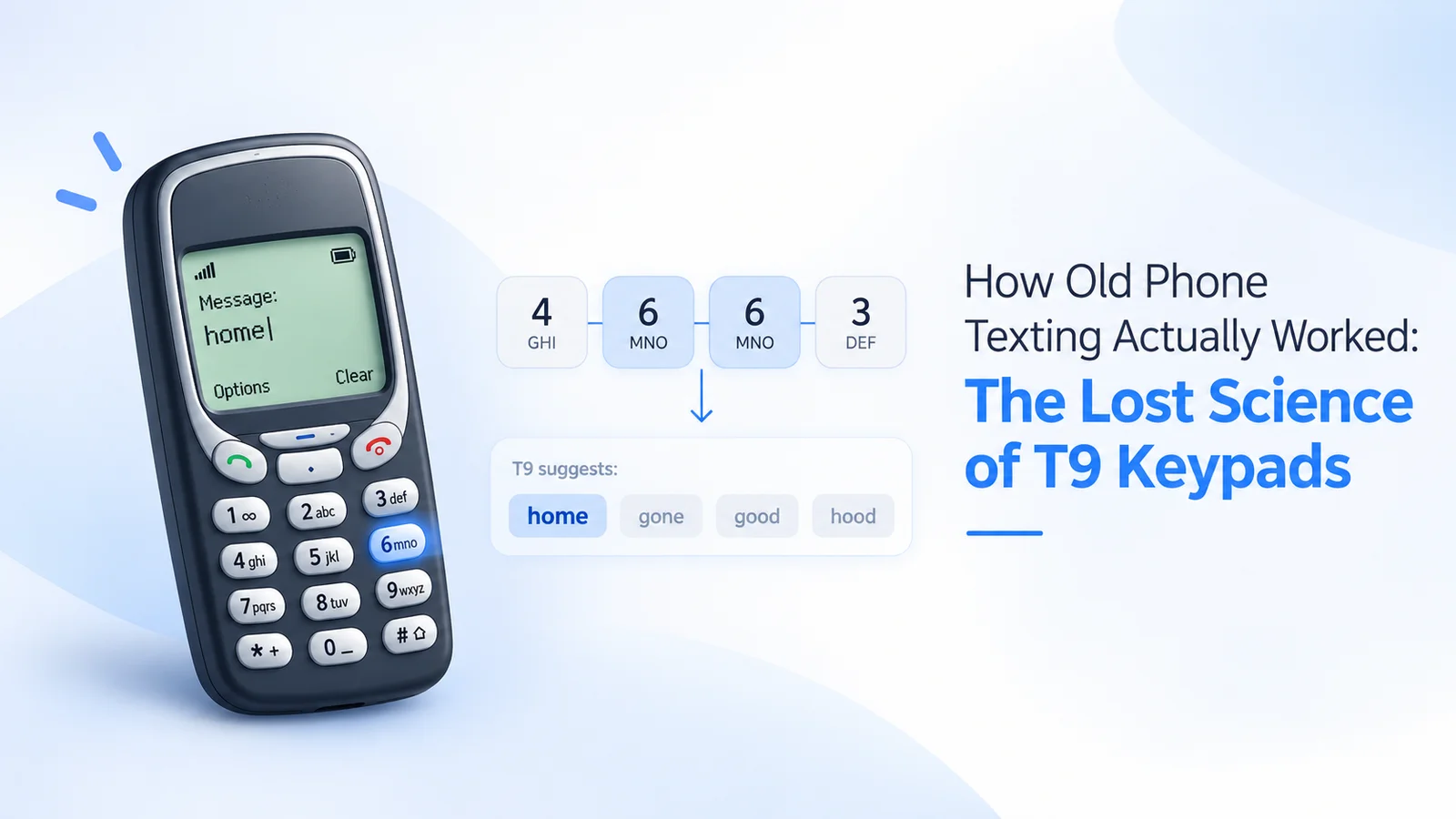
The greatest mathematical hurdle for T9 was the textonym—a situation where different words share the exact same sequence of numbers.
For example, the numeric sequence 4 - 6 - 6 - 3 can spell:
- GOOD (4 = G, 6 = O, 6 = O, 3 = D)
- HOME (4 = H, 6 = O, 6 = M, 3 = E)
- GONE (4 = G, 6 = O, 6 = N, 3 = E)
- HOOD (4 = H, 6 = O, 6 = O, 3 = D)
How did T9 decide whether you meant "good" or "home"?
The engine utilized an internal corpus frequency weighting table. Because "good" is statistically more frequent in everyday conversational English than "home" or "gone", T9 served "good" as the primary suggestion. If you actually wanted "home", you pressed the * (or 0) key, which cycled through the candidates in order of statistical likelihood.
3. The Dynamic User Database (UDB)
If you typed slang, a local city name, or a friend's unique nickname that didn't exist in standard Oxford English, T9 allowed you to switch to Multi-Tap once to spell the word manually.
The phone saved this word into its local volatile or flash User Database (UDB). The next time you typed that number sequence, T9 automatically prioritized your customized word over the default dictionary match.
The Lost Superpower: Why Blind Texting on Physical Keypads Was Faster
Modern glass capacitive touchscreens are flat, smooth, and frictionless. Because glass has no physical landmarks, your brain cannot rely on physical tactile feedback. If your eyes wander away from a glass screen for even two seconds, your thumbs inevitably drift off-center, producing a string of garbled gibberish.
Old physical keypads, however, offered three sensory advantages that modern smartphones have never been able to replicate:
1. The "Homing Pip" on Key 5
Just like the tactile ridges on the F and J keys of a computer keyboard guide your index fingers for touch typing, every numeric keypad had a molded plastic dot or raised ridge on the center 5 key.
By resting the pad of your thumb on that tactile pip, your brain's spatial cortex instantly knew the relative coordinates of all 8 surrounding keys without looking.
2. Definite Switch Travel & Actuation Snap
Old phone buttons were dome-switch mechanics with a tactile break force. You felt a physical "snap" and heard an audible click when a key was registered. On a touchscreen, haptic vibration motors buzz after the OS software registers the capacitive touch point, introducing latency and ambiguity.
3. True Single-Handed Proprioception
Because mobile handsets in the 2000s were compact (often less than 50mm wide), your thumb could sweep across the entire 12-key matrix without rebalancing or shifting your palm grip.
During the peak of the T9 era, competitive texters routinely clocked 40 to 55 Words Per Minute using a single thumb on a Nokia keypad. In 2007, Norway's Sonja Kristiansen set a Guinness World Record by typing an official 160-character competition text in 37.28 seconds—an effective speed of over 48 WPM on a numeric keypad.
Want to Test Your Vintage Thumb Speed?
Put your muscle memory to the ultimate test. Try our interactive retro phone keypad simulator and see how many WPM you can score on a virtual 3×4 numeric layout.
Launch T9 Keyboard Simulator →The 2026 Dumbphone Resurgence: Why Keypads Are Back
In recent years, an unexpected cultural shift has taken hold: the "Dumbphone Revolution." Driven by digital fatigue, social media burnout, and a desire to reclaim attention spans, hundreds of thousands of professionals and students are swapping smartphones for modern 4G feature phones.
Devices like the Light Phone II, the Punkt MP02, and modernized Nokia flip phones (running KaiOS) have brought T9 and numeric keypad typing back into daily life.
Interestingly, the friction of typing on a keypad is now viewed as an intentional feature, not a bug. When typing a text requires physical deliberation rather than mindless swiping, people send fewer trivial messages, communicate with greater clarity, and spend less time staring into glowing rectangles.
Even Apple recognized this enduring muscle memory: in iOS 18, Apple officially incorporated T9 predictive contact dialing directly into the native iPhone Phone app keypad, allowing users to type numbers like 6-6-6-6 to instantly search for names on their contact lists.
Key Takeaways: What T9 Taught Us About Human-Computer Interaction
The story of T9 is a reminder that newer technology does not always mean better ergonomics. While modern capacitive QWERTY touchscreens excel at versatility—allowing us to switch between emojis, languages, and trackpads seamlessly—they traded away physical proprioception in the process.
T9 succeeded because it respected human biology. It paired the tactile certainty of mechanical buttons with the statistical elegance of language modeling, proving that with the right predictive algorithms, nine simple keys were more than enough to connect the world.